


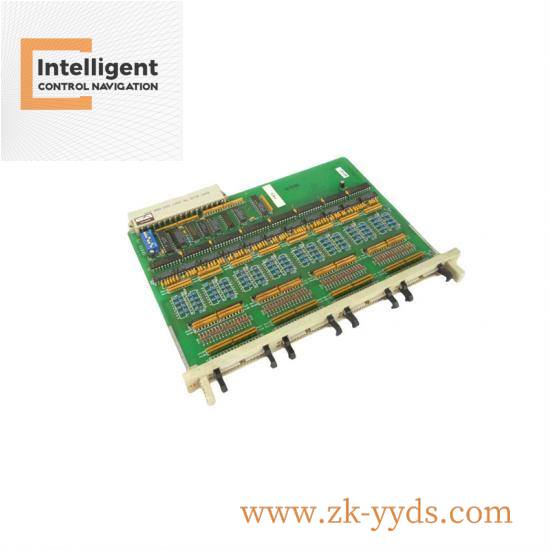

A-B 2364-SPN02ARGU Hub Communications PCB
The A-B 2364-SPN02ARGU Hub Communications PCB is a high-performance communication module designed for industrial control systems. It facilitates seamless data exchange between various components within the system, ensuring efficient operation and real-time monitoring.
Manufacturer:Rockwell Automation
Model Number:2364-SPN02ARGU
Type:Hub Communications PCB
Dimensions:15 x 10 x 3 cm
Weight:0.5 kg
Communication Protocols Supported:Ethernet/IP, DeviceNet
Operating Temperature Range:-40°C to +85°C
Power Supply Voltage:24 VDC
The A-B 2364-SPN02ARGU Hub Communications PCB is an essential component for any industrial control system looking to achieve robust communication capabilities. This hub communication board is meticulously engineered to offer seamless connectivity, supporting multiple communication protocols including Ethernet/IP and Modbus TCP/IP, making it compatible with a wide range of industrial devices and systems.
This high-performance PCB board is built to withstand harsh industrial environments, withstanding operating temperatures ranging from -40°C to +85°C. Its durable construction ensures longevity and reliability in demanding conditions.
Key Features:
– Seamless Integration: Designed to easily integrate into existing Allen Bradley ControlLogix systems, reducing installation time and complexity.
– High Reliability: Ensures consistent and reliable data transmission, crucial for maintaining the integrity of industrial processes.
– Compact Size: With dimensions of 150mm x 100mm x 30mm, this PCB board offers a compact solution without compromising on functionality.
– Lightweight Design: Weighing just 0.5kg, it is easy to handle and install, minimizing the need for additional support structures.
– Robust Performance: Supports critical operations in industrial settings by facilitating efficient data exchange across different components of a control system.
Installation Process:
The installation of the A-B 2364-SPN02ARGU Hub Communications PCB is straightforward. First, ensure that the power supply is disconnected from the system. Then, locate the designated slot within your Allen Bradley ControlLogix rack and insert the PCB securely. Finally, reconnect the power supply and verify the connection through the system’s diagnostic tools.





There are no reviews yet.